
Customizable position of split-screen keyboard
 Fränky TESTER Duo ·
What would you like?
I would like to be able to set the spaceing for the split-screen keyboard.
Current:
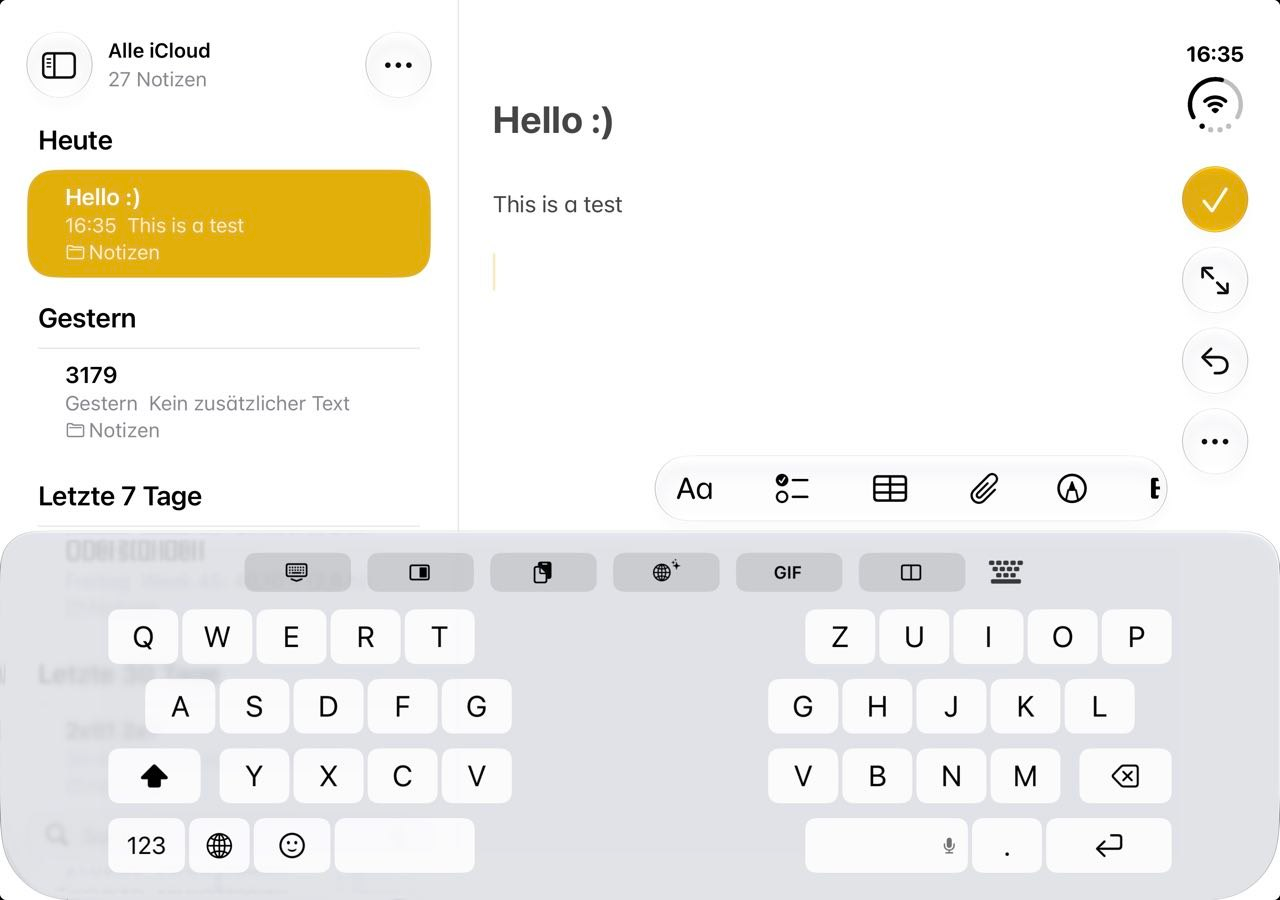
What I would like:
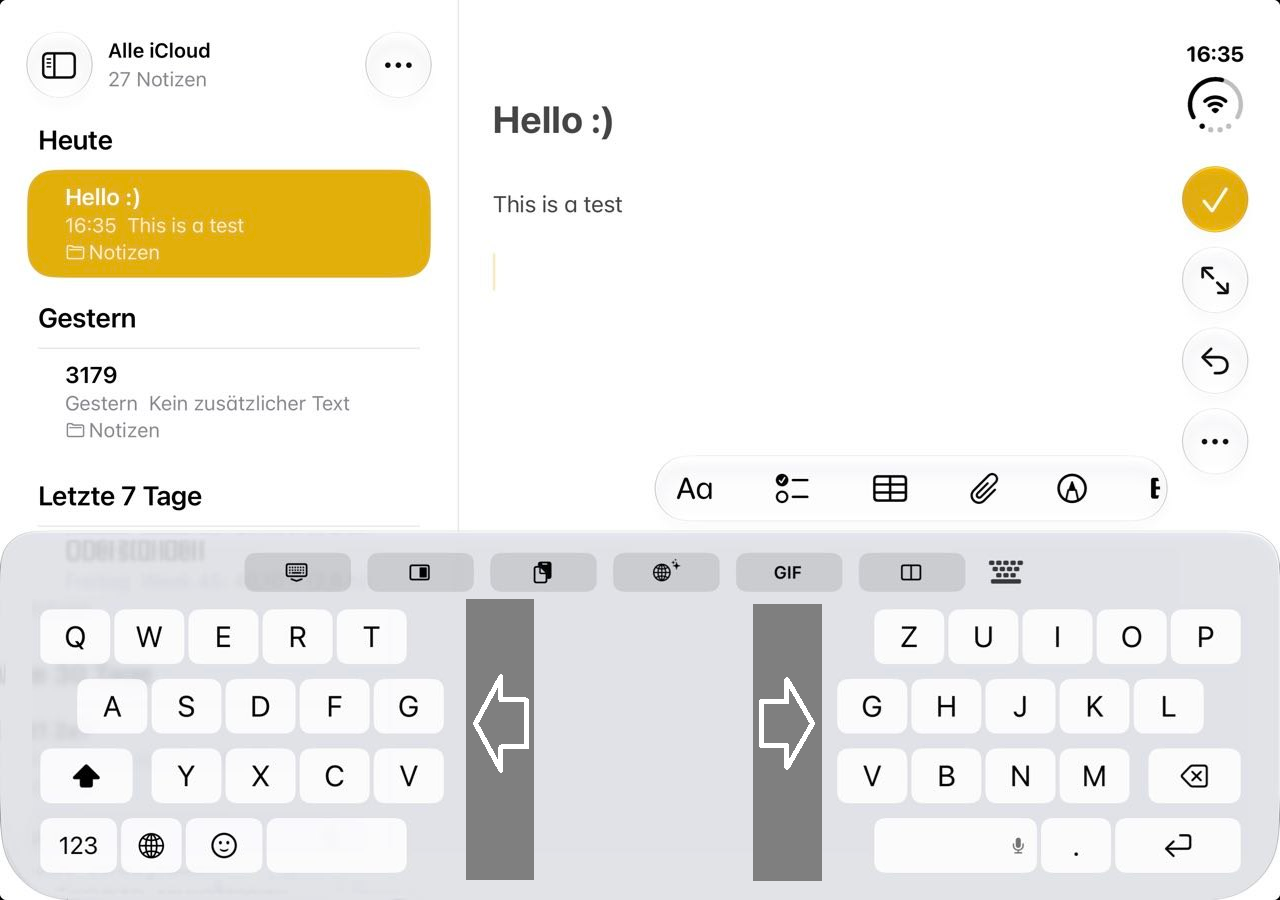
Another nice feature would be to set the height of buttons as well.
Why it would help
I have trouble reaching the inner keys comfortably. Allowing me to set my own spacing would be wonderful and it seems like an easy fix to add a toggle somewhere in settings.
Thank you for this great app! Replaced swiftkey for me :-)
Discussion
Sign in to comment or vote.
Yes, this would help me a lot.
@Fränky the halves were sitting inside the side margins iOS keeps on the Duo's inner screen, so they never reached the edges. Fixed for build 470 (and 2.2.2 on the App Store): Keyboard › iPhone Duo › Halves out to the screen edges moves both halves to the edges without shrinking the keys, and Split keyboard half width makes the halves wider if you want the gap smaller. Key height is already under Style › Keyboard height.
@efko Just tested this. There's no difference in width when the toggle is on or off. Also, when I select the globe icon to switch back to ios keyboard, the currently open app crashes. Doesn't matter the app.
@Fränky I was wrong about the margins: on the unfolded Duo iOS gives a third-party keyboard only the middle 801 of the 951 points, and nothing can be drawn or tapped outside that, so the toggle had nothing to move. Fixed for build 473 (and 2.2.2 on the App Store): the toggle is gone and Split keyboard half width now goes down to 60%, which puts the inner keys about 50 pt closer to your thumbs than 80% does. For the globe crash I need the crash log from Settings › Privacy & Security › Analytics & Improvements › Analytics Data (the newest file named after the app that crashed, like MobileNotes-…), and whether it also crashes in portrait or with the Duo folded.
@efko Here's the log. I renamed it to .txt because it won't let me upload .ips or .zip.
Worth noting:
Phone closed works without problems. When I unfold it while the app is open (or running in the background and then opened) it keeps working. When I force close the app and restart the app and then switch keyboard, the problem appears.
Also worth mentioning: If the problem appears once, there is no way to fix it while the phone is still unfolded. You have to fold it up, switch keyboards while the phone is closed, and then unfold it again, then the switching works again.
See attached video.
MobileNotes)iPhone19,4NSRangeExceptionSIGABRTError Details
Exception Type:
NSRangeExceptionError Message:
Explanation:
The iOS keyboard management system attempted to access the 43rd element of an array that only contained 42 elements. This caused an out-of-bounds exception, resulting in the application crashing with
SIGABRT.Relevant Stack Trace (Excerpt)
Technical Analysis
The crash occurred during a keyboard input mode switch.
The stack trace suggests that iOS was attempting to update or reinitialize the keyboard interface when an invalid array index was accessed.
The exception originates from Apple's UIKit keyboard management components.
Possible Cause:
The crash may be related to switching between keyboard input modes, potentially involving a third-party keyboard.
However, the crash report alone does not establish whether the issue originates from iOS itself or was triggered by a third-party keyboard extension.
@efko The crash is still happening when switching with the globe icon.
I will open another issue for the globe-problem since this ticket was origanally for the position of split-keyboard which you already "fixed" as far as the ios limits allow :-)
thx