
Next-Gen Input Flexibility: Advanced Customization & Adaptive Touch Calibration...a few inspirations
What would you like?
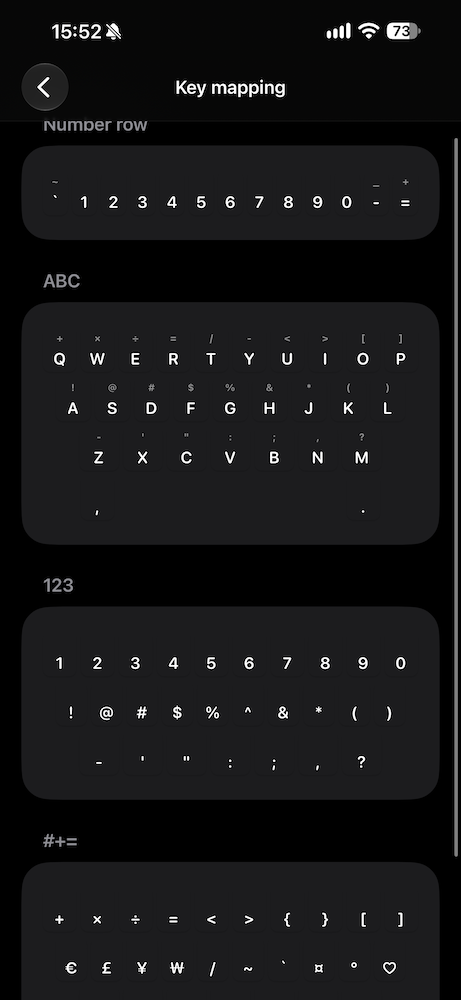
To give you an idea of what sparked these thoughts, I was recently looking at this keyboard app for inspiration. While it's not usable for me as a daily driver, since it lacks gesture typing and doesn't support languages other than English and French 🙄, it did have a few interesting concepts that got me thinking about features we could adapt:
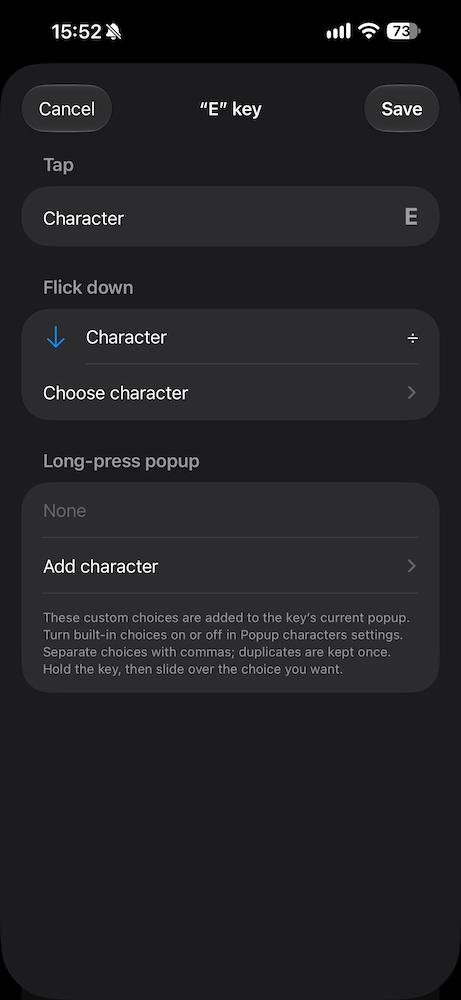
1. Per-Key Customization (Long-Press & Flick-Down Gestures)
Allow users to fully map individual long-press and flick-down gestures for every key on the layout, extending secondary action customization beyond global defaults or specific key exceptions.
- User benefits:
- Efficiency & Speed: Access frequently used symbols, numbers, or shortcuts with a single fluid movement (flick-down or hold) without switching layouts/layers.
- Personalized Ergonomics: Tailor keys based on individual typing habits, coding needs, or specific jargon.
- Power-User Appeal: Transforms the keyboard from a standard input tool into a fully tailored productivity tool.
- Dev benefits:
- Value / ROI: Highly appealing to power users; creates strong app retention and loyalty.
- Implementation: Requires a flexible internal key-mapping system (JSON/dictionary structure mapping standard key IDs to
onLongPressandonFlickactions). - Design / UX: Pre-configured presets (e.g., "Developer", "Symbol-heavy") can mitigate setup friction.
2. Granular Pop-up Character Customization (Accent/Diacritic Management)
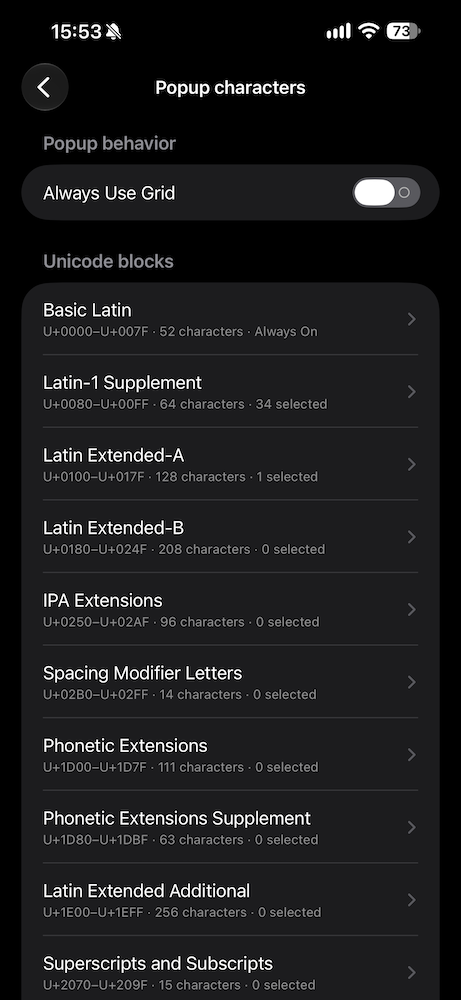
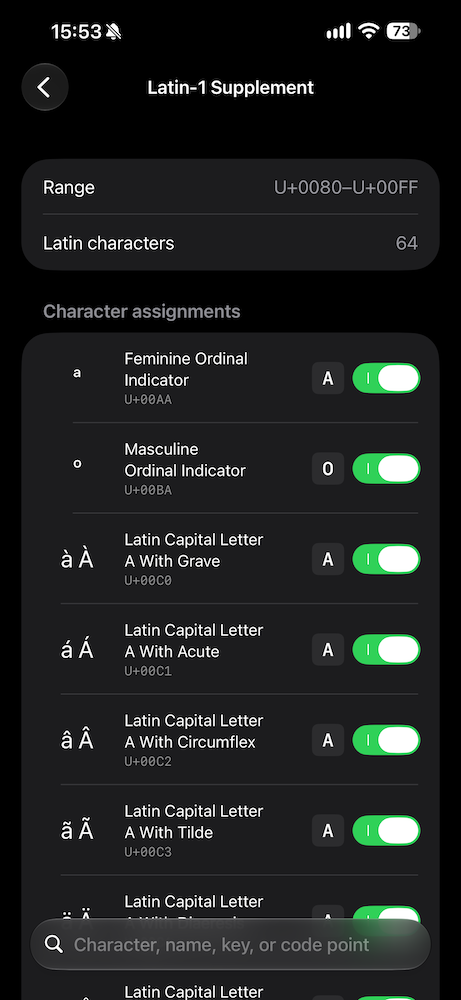
Give users control to toggle on, off, or reorder specific pop-up characters (diacritics/alternate symbols) that appear during a long-press.
- User benefits:
- Clutter Reduction: Eliminates irrelevant accents/symbols for non-native languages, speeding up character selection.
- Faster Typing: Reduces muscle memory errors when targeting specific diacritics on common keys (e.g.,
e,a,o). - Multilingual Flexibility: Enables users to curate only the exact set of accents they actually use.
- Dev benefits:
- Value / ROI: Directly improves daily user satisfaction and reduces UI visual fatigue with minimal overhead.
- Implementation: Moderate complexity. Standard keyboard frameworks usually maintain static array lists for pop-up character maps. Converting these arrays to user-editable, filtered lists requires setting up a basic preference persistence layer.
3. Dynamic Typing Calibration via Practice Exercises
Incorporate targeted typing exercises (passages and word drills) that analyze real-time touch coordinates (heatmaps/touch offsets) to calibrate key target areas to a user's natural finger landing spots over time.
- User benefits:
- Reduced Error Rate: Adapts to individual hand sizes, finger reach, and typing posture, significantly reducing fat-finger errors.
- Gamified Onboarding: Gives users an engaging, structured way to train the engine while actively improving their typing speed.
- Personalized Accuracy: Creates an adaptive input layer tailored specifically to how the user physically interacts with the screen.
- Dev benefits:
- Value / ROI: Major competitive differentiator and marketing feature. Dramatically increases accuracy metrics and user retention.
- Implementation: Not 100% certain huge much complexity is involved in this.
- Requires logging raw touch coordinates relative to bounding boxes during exercises.
- Unsure if Apple has on-device Gaussian/probabilistic model (or key centroid offset model) that shifts active target zones without adding latency to touch event processing.
- Privacy Consideration: Touch model processing should remain strictly on-device to maintain user trust and satisfy data privacy standards.
Discussion
Sign in to comment or vote.
I like the idea of arrow buttons.
Btw, EFKey already supports the flick down gesture (in the current Testflight versionat least). You can enable it under keyboard → gestures → corner character by flicking down.
Dumb question. Where do I find the secret Testflight link 😊
If you want to be a tester on Testflight, you'd have to PM efko, because there are limited spots for that.
But the flick gesture should be available in the current App Store version 2.2 as well.
@efkey I like your suggestions here a lot, and I like how you write them up: what each idea gives the user, what it means on my side, and screenshots of where you saw it. That makes them really easy for me to plan. On the touch calibration in this one: the keyboard already learns where you tap from normal typing, no exercises needed. What's missing is a reset button for that, and I'll add it. Could you ping me on Discord? https://efkey.app/discord I'd like to go through your ideas with you there. Also, your username here is "efkey", so it looks like I'm sending suggestions to myself :D Want to change it?
It would be cool to be able to see a heatmap of where the keyboard has seen taps and be able to see other info related to this existing system
@Kopi of the three ideas here, the touch one is done: Typing › Where you tap shows where you actually hit each key, with the reset I promised. @expipiplus1 that's your heatmap too. It's in build 464, and in 2.2.1 on the App Store. The other two aren't built yet. Right now flick down types the key's corner symbol, and the long-press list can only be edited on period, comma and 123, not per letter or per accent. Could you post those two as separate suggestions? Then each one gets its own votes and I can close this one once it's tested.
Hmm, the heat map doesn't seem to work for me, I have 0 taps recorded even after typing for a little while.
It's also not clear what the difference between keys and taps is, although both at empty for me currently.
Can't wait to use it :)
Go out of there and come back. There's no auto-refresh in there, kind of. I know about that bug.
@expipiplus1 the screen only loaded your taps when you opened it, so if it was already open when you went off to type, it kept showing 0. Keys moves each key to where you actually hit it, Taps shows every tap as a dot. Fixed for build 466: the screen refreshes as soon as you come back to the app, and the explanation of each view stays visible even when the map is empty.
I was recently looking at another keyboard app for inspiration (well worth poking around to learn a few good and bad implementation designs). Although, I'm sure what the dev was smoking considering the lifetime price (I'd have to sell one of my kidneys), but hey, it's a free market 😊 Their custom layout UI/UX flow is remarkably intuitive.
The key takeaway here is layout flexibility:
Enabling users to create, export, and share custom keymaps within the community. Instead of the @efko having to manually build every single niche layout request (I'm exaggerating a bit), users can simply tailor their own keymap or download one created by others here on the community or in the app....And sine you like me write from last time:
The is more a long-term roadmap, as I'm aware this isn't implemented in a weekend 😊
Overview
Provide a visual, intuitive interface for configuring tap, hold, shift-state, and flick/pull-down actions for any key on the board, complete with row height and key distribution settings. Many keys and customization options are already available in EFkey.
User benefits
Ultimate personalization: Users can rearrange rows, add custom function keys (like quick-paste, macros, or cursor control), and map flick gestures tailored to their exact workflow.
Reduced cognitive load: Clean UI flows (like state toggles for default versus shifted actions) make advanced custom key assignments straightforward to set up without complex syntax or configuration files.
Dev perspective
Community keymap sharing and import/export
When it comes to sharing different layouts, one could also extend this beyond just simple keyboard layout e.g. plugins. This keyboard Clink has an in-app "plugin directory" whe you can even create your own plugins. A few nice ideas beyond that too, but pretty rough around the edges, still early. Nonetheless, never hurts to get inspired and build on top of it, remix, reinvent... 😊
Overview
Allow users to export their custom keymaps as lightweight configuration files or shareable links, enabling community-driven layout distribution.
User benefits
Dev perspective